Tatoeba, by Kanjiverse
· 3 min read
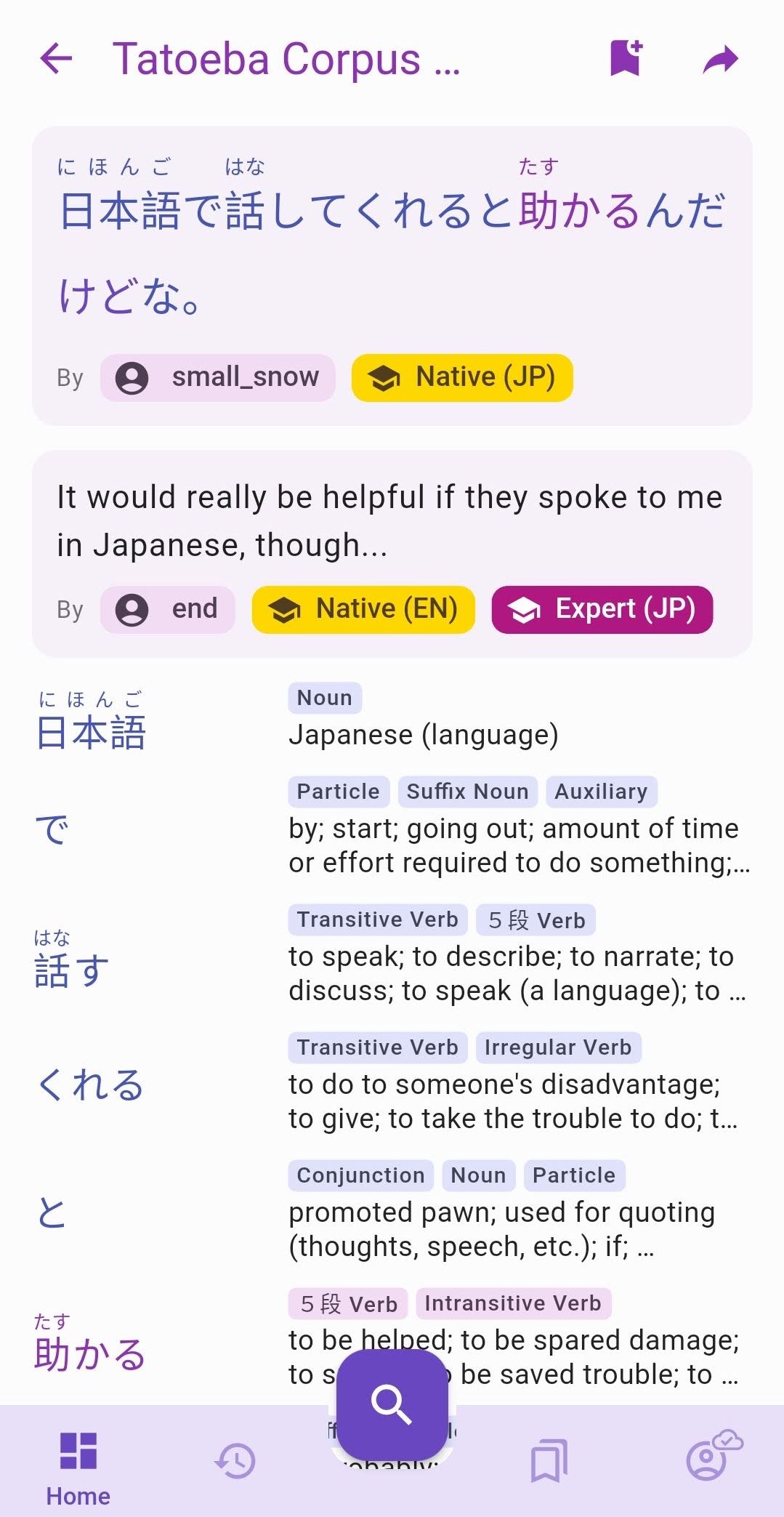
The latest version brings long awaited features to an aspect of the app that has been left aside for too long. Each of the **220,000 sentences **now has its own dedicated page with the following features:
- Can be shared and bookmarked to My Lists, just like Kanji and words.
- All words are color-coded by frequency and hyperlinked to their own page. They are also displayed as a list of tiles below the sentence.
- Attributed to its author when known, with a link to their Tatoeba profile page, and their level of fluency in the corresponding language. Same is done for translations.
- List of sentences are sorted by difficulty which is indicated by the same kind of frequency tag and color used for kanji, words and readings.
- Saved to History and can be filtered by Sentences.
Check it out on the web too: https://app.kanjiverse.com/tatoeba/10760549
Changelog v0.8.0
- kanji in words on JMdict Variants Card can be tapped to open their page
- other variants in JMdict Variants Card can be tapped to switch to their page
- fixed app first open showing a 404/unkown page
- fixed card transition not animating the shadow and color change
- fixed particle and punctuation frequency
- fixed multiple identical routes that can be pushed on top of each other
- app bar shows Japanese word's kana/romaji too
- words in sentences are colored by frequency
- sentences in lists are sorted by their difficulty (the ones with most common words first)
- sentences in lists can be tapped to open their page
- sentences have their own page, url and can be shared
- sentences can be bookmarked and added to My Lists
- each sentence page has a Japanese card, zero, one or multiple translation cards (for each available language) and a list of Word Cards for each word in the sentence
- Japanese and Translation cards displays the author's name and fluency level when available
- author's tag can be tapped to open their tatoeba profile page
- author's fluency levels are the same as learner's levels, from novice to expert, plus an extra "Native" level (gold colored)
- words can be tapped to open their page
- sentences are saved to user's history
- History screen has a new "Sentence" filter
- fixed text height when there are no furigana in a sentence
- a list's summary shows its number of sentences along with the usual kanji and word count